

Permissions Reporter 5 introduces comprehensive SID history tracking and resolution capabilities, enabling administrators to effectively audit NTFS permissions in environments that have undergone Active Directory domain migrations. This article explains what SID history is, why it matters for permissions analysis, and how to use Permissions Reporter to answer critical security questions about migrated accounts.
What is SID History?
When organizations migrate user and group accounts between Active Directory domains - whether during mergers, acquisitions, domain consolidations, or forest restructuring - the migrated accounts receive new Security Identifiers (SIDs). To maintain access to resources in the original domain, migration tools like the Active Directory Migration Tool (ADMT) copy the original SID into a multi-valued attribute called sidHistory on the new account.
This sidHistory attribute allows users to retain access to file shares, folders, and other resources that still have the old SID in their Access Control Lists (ACLs). Windows automatically checks sidHistory during access token creation, granting the user the same permissions they had before migration.
Example: A user OLDDOMAIN\jsmith with SID S-1-5-21-1234567890-...-1001
is migrated to NEWDOMAIN\jsmith with a new SID S-1-5-21-9876543210-...-2001.
The original SID is stored in sidHistory. When jsmith accesses a file server that still has ACLs
referencing the old SID, Windows recognizes the sidHistory match and grants access.
Why SID History Matters for Permissions Auditing
While sidHistory solves the immediate access problem during migrations, it creates challenges for security auditing and compliance:
- Stale ACLs - File system ACLs may contain SIDs from the old domain indefinitely, making it difficult to understand who actually has access.
- Orphaned permissions - If sidHistory is later removed from accounts, permissions referencing old SIDs become orphaned and unresolvable.
- Disabled and deleted accounts - Migration often surfaces disabled account permissions that never got cleaned up during offboarding.
- Security risks - sidHistory can be exploited in certain attack scenarios, making it important to track and eventually remediate.
- Compliance requirements - Auditors need to understand effective permissions, which requires correlating historical SIDs to current accounts. See our NTFS security & compliance FAQ for audit frequency and documentation guidance.
Enabling SID History Resolution
SID history resolution in Permissions Reporter is controlled via a global option. When enabled, the application will automatically resolve historical SIDs found in file system ACLs to their current account identities by querying the Active Directory Global Catalog.

To configure SID history resolution:
- Open Global Options from the Tools menu.
- Navigate to the Performance tab.
- Enable or disable the Resolve historical SIDs option.
Best practice: Enable SID history resolution for post-migration security audits to understand the true identity behind historical SIDs. Disable it for forensic scenarios where you need to preserve and report the original SIDs exactly as they appear in ACLs.
How SID History Resolution Works
When Permissions Reporter encounters an unresolved or orphaned SID during a permissions scan, and SID history resolution is enabled, the following process occurs:
- The application first attempts standard SID resolution against the associated domain.
- If the SID cannot be resolved directly, a Global Catalog query searches for any account with this SID in its sidHistory attribute.
- If a match is found, the current account details are retrieved and associated with the permission entry.
- The original (historical) SID is retained for audit and reporting purposes.
This approach provides the best of both worlds: you see the current account identity while retaining visibility into the legacy SID that actually exists in the ACL.
Viewing SID History Information
When a principal is resolved via SID history, Permissions Reporter displays a special indicator in the Principals Report. This indicator shows:
- Original SID - The historical SID that was found in the file system ACL.
- Source domain SID - The domain SID from which the account was migrated.
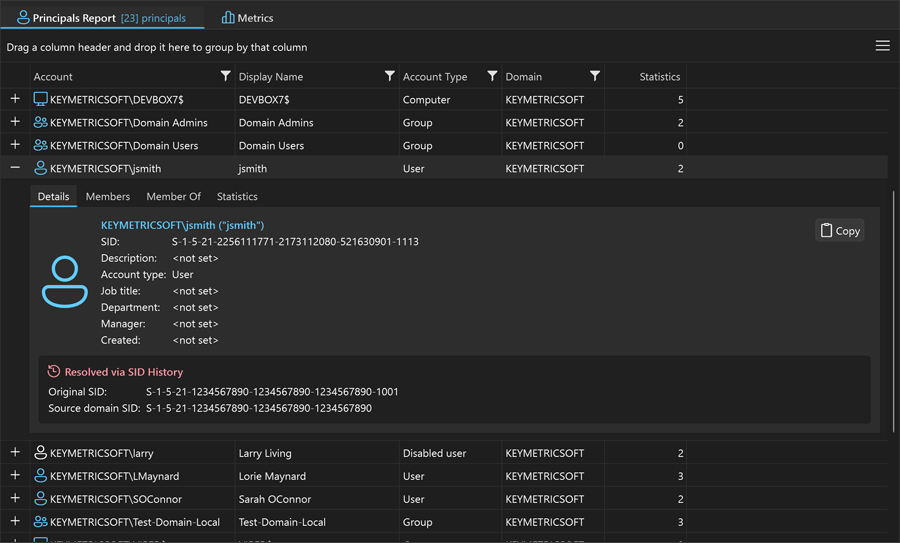
This information is also available in the principal details view that is shown when a principal is selected in the folder permissions tree.
Filtering by SID History
Permissions Reporter's advanced filtering system allows you to target permissions involving historical SIDs. This is invaluable for answering questions like:
- "Which folders still have ACLs referencing SIDs from our old domain?"
- "How many permissions are associated with migrated accounts via sidHistory?"
- "Which users have access through historical SIDs that should be remediated?"
To filter for permissions resolved via SID history, use the post-scan filter with the "Resolved via SID history" condition. This will isolate all permission entries where the principal identity was determined through sidHistory lookup rather than direct SID resolution.
Common SID History Scenarios
Scenario 1: Post-Migration Security Audit
After migrating users from OLDDOMAIN to NEWDOMAIN, you need to verify that permissions are working correctly and identify any ACLs that should be updated.
Solution: Enable SID history resolution and run a permissions scan. Use filtering to find all permissions resolved via sidHistory. These represent ACLs that still reference the old domain SIDs and may need to be re-ACLed to reference the new SIDs directly.
Scenario 2: SID History Cleanup Planning
Your security team wants to remove sidHistory from migrated accounts to reduce attack surface, but needs to understand the impact first.
Solution: Run a permissions scan with SID history resolution enabled. The report will show exactly which resources each user accesses via their historical SIDs. Use this data to plan ACL remediation before removing sidHistory attributes.
Scenario 3: Identifying Orphaned Historical SIDs
You've discovered unresolved SIDs in your file system ACLs and need to determine if they belong to migrated accounts or are truly orphaned.
Solution: With SID history resolution enabled, Permissions Reporter will automatically attempt to correlate unresolved SIDs with current accounts via sidHistory. SIDs that remain unresolved after this process are likely from deleted accounts or domains that no longer have trust relationships. For guidance on handling these orphaned entries, see Finding Orphaned SIDs and Deleted Accounts.
Performance Considerations
SID history resolution requires additional Active Directory queries against the Global Catalog when unresolved SIDs are encountered. In environments with many historical SIDs, this may increase scan times. To optimize performance:
- Ensure fast network connectivity to your Global Catalog servers.
- Consider adjusting LDAP query timeout settings in Global Options if queries are timing out — see the performance tuning guide for additional options.
- For very large scans, schedule them during off-peak hours.
Permissions Reporter caches SID history lookup results (including negative results) during a scan session to avoid redundant Global Catalog queries for the same SIDs.
Best practice: Run Permissions Reporter on a domain member computer with good connectivity to your Global Catalog servers for optimal SID history resolution performance.
Related Resources
- Orphaned SIDs and Deleted Accounts — clean up unresolvable SIDs after migration
- Disabled Account Permissions — find stale permissions left behind by offboarded users
- Auditing NTFS Permissions — build repeatable scheduled audit reports
- Principals Report — see migrated accounts alongside their sidHistory resolution
- Principal Security Metrics — dashboard view of unresolved and historical SIDs
- Advanced Filtering — isolate permissions resolved via sidHistory